Restaurants in Malaysia get more Google reviews by putting the review link one scan away, asking every diner at a natural moment, replying to every review and keeping their Google Business Profile complete. Just as important is what not to do: no rewards for reviews, no pressure at the table and no telling customers what to write.
Most diners are happy to help a place they enjoyed. They simply leave, get busy and forget. This guide walks through a simple routine any restaurant, cafe or kopitiam can run every day — and the Google rules that keep your reviews safe from being removed.
Why don't happy diners leave Google reviews?
When a diner says "the food was great" at the counter but never posts a review, the reason is rarely the food. It is usually one of these:
- The path is too long. They have to open Google Maps, search for your restaurant, find the reviews tab and then start typing.
- Nobody asked. Most people do not think about reviewing unless someone mentions it.
- The moment passes. The best time to ask is right after a good meal. Once they are back in the car, the review is forgotten.
None of these needs a discount or a lucky draw to fix. They need a shorter path and a polite, consistent ask. We looked at the psychology behind this in why customers actually want to post reviews.
Step 1: Get your Google review link or QR code
Google lets every business share a direct link or QR code that opens the review form for that business. You will find the option to ask for reviews inside your Google Business Profile. Download the QR code and copy the short link — these two items are the foundation of everything else in this guide.
Use the direct review link, not a general link to your Maps listing. Every extra tap loses some diners.
Step 2: Put the QR code where diners already look
A QR code works best where diners naturally pause. Here is a simple placement plan:
| TouchpointWhat to do | |
| Table | A small table tent with the QR code and one line: "Enjoyed your meal? Tell others on Google." |
| Receipt | Print the QR code or short link at the bottom of every receipt. |
| Cashier counter | A stand-up card next to the payment terminal, where diners wait for a few seconds anyway. |
| Takeaway and delivery | A sticker on the bag or a small card inside the packaging. |
| WhatsApp orders | Add the review link to your thank-you message after the order is completed. |
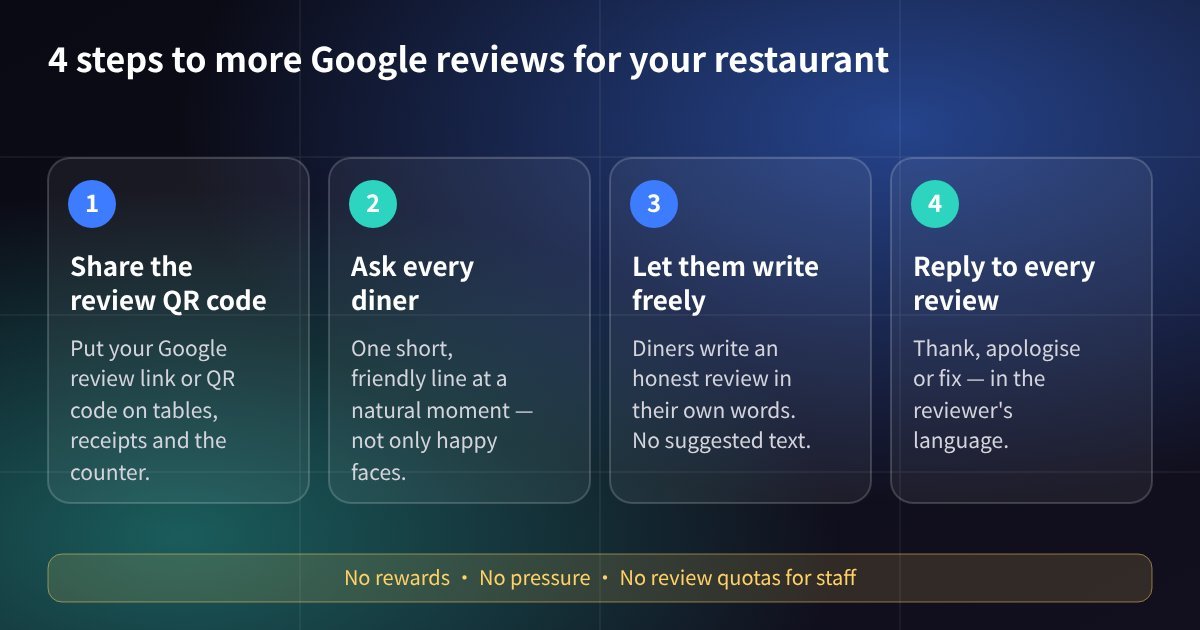 A simple daily routine for getting more Google reviews
Step 3: Ask every diner — the right moment and the right words
The ask matters more than the poster. Train your team to ask in a short, friendly way when the moment is natural — for example when a diner compliments the food or while they are paying:
"Thank you for coming today! If you have a minute, we would really appreciate a Google review — the QR code is right here."
Three rules for the ask:
- Ask everyone, not only the happy faces. Google does not allow businesses to selectively ask satisfied customers for reviews.
- Do not tell diners what to write. Invite an honest review in their own words. Google's policy says businesses should not request that specific content be included in a review.
- No pressure. Ask once and let it go. Never make it a condition, and do not stand over the table waiting for them to post.
For staff, the goal is a habit, not a target. Google also does not allow businesses to ask staff to collect a certain number of reviews, so avoid review quotas.
What Google does not allow (and why it matters)
Reviews that break Google's rules can be removed. These are the practices to avoid, based on Google's Maps user-generated content policy and Google's tips to get more reviews:
| Don'tDo instead | |
| Offer a discount, free drink, cash or a lucky draw for a review | Ask politely, with nothing in return |
| Ask only diners who look happy | Ask every diner the same way |
| Give diners text to copy, or ask them to mention a dish or a staff name | Invite an honest review in their own words |
| Pressure diners to review before they leave | Make it easy and optional |
| Set review quotas for staff | Build a consistent habit of asking |
| Buy reviews or ask friends to post fake ones | Earn reviews from real visits |
Reply to every review, good or bad
Replies show future diners that someone is listening. Thank positive reviewers by name and mention something specific they said. For a negative review, stay calm, apologise for the experience, explain what you will fix and invite them to contact the manager directly. Do not argue in public.
Reply in the language the reviewer used — English, Bahasa Malaysia or Chinese. Diners in Malaysia notice when a restaurant takes the effort.
Reply examples
- Positive review: "Thank you for taking the time to write this! We're glad you and your family enjoyed the meal. See you again soon."
- Negative review: "We're sorry you had to wait so long — that's not the experience we want for our guests. We're adjusting our staffing for busy hours. Please contact our manager directly so we can make it right."
Treat these as a starting point and adjust every reply to what the reviewer actually wrote, so your replies never look copy-pasted.
Keep your Google Business Profile complete
New reviews work best on a profile that looks alive. Check these regularly:
- Correct name, address, phone number and opening hours, including public holidays
- Your menu and price range
- Fresh photos of signature dishes, the dining area and the shopfront
- Regular posts about new dishes, festive menus and promotions
Beyond Google: let happy diners share on social media too
A diner who enjoyed your food may also want to post on RedNote (Xiaohongshu), Instagram, TikTok, Lemon8 or Facebook. Those posts reach friends and followers who are deciding where to eat next.
This is where MyShopReview helps. Your diners scan a QR code, pick from your shop's official photos and a few AI-written caption ideas, change the words to match their own experience and post it themselves — or choose not to post at all. Keep the same standards as Google: invite every real customer, offer nothing in return and let them say it their way. For tips on what makes a social post work, see how to write viral reviews for RedNote and Instagram.
Key takeaways
- Use your direct Google review link or QR code and place it on tables, receipts, the counter and takeaway packaging.
- Ask every diner once, at a natural moment, with a short friendly line.
- Never offer rewards, never ask only happy diners and never tell diners what to write.
- Reply to every review in the reviewer's language.
- Keep your Google Business Profile complete, and give happy diners an easy way to share on social media as well.
FAQ
Q: Can I give customers a discount or free dessert for leaving a Google review?
A: No. Google does not allow reviews posted because of an incentive, and those reviews can be removed. Ask politely with nothing in return.
Q: Can I ask only the customers who look happy?
A: No. Google does not allow businesses to selectively ask satisfied customers for reviews. Ask every diner in the same way.
Q: Can I suggest what customers should write, such as mentioning our signature dish?
A: No. Google's policy says businesses should not request that specific content be included in a review. Invite an honest review in the customer's own words.
Q: Where should I put my Google review QR code?
A: Where diners naturally pause: table tents, receipts, the cashier counter, takeaway bags and your WhatsApp thank-you message.
Q: Should I reply to negative reviews?
A: Yes. Reply calmly, apologise for the experience, explain what you will improve and invite the customer to contact you directly.
Want your happy diners to share on social media as easily as they scan a QR code? Book a free 15-minute demo and see how MyShopReview works for restaurants.